Equipment
QR codes in Gigover: Anyone can report an equipment fault in seconds
Every piece of equipment gets its own QR code. Whoever notices a fault scans the code with their phone, and the report goes straight to the person responsible for that equipment.
Published September 2026 · The Gigover Team
The person who first notices a fault is rarely the person responsible for the equipment. A shop assistant sees that the cooler isn't holding temperature, a caretaker notices the shared washing machine is leaking, or a teacher finds the projector won't turn on. Then the search begins: Who owns this? Who do I call? What's the serial number? All too often it ends in a phone call that's forgotten or an email that gets lost.
With the new QR codes in the Resources section of Gigover, that search is over.
How it works
- Every piece of equipment gets its own QR code. The code is created in Gigover as soon as the equipment is registered in Resources.
- The code is printed and attached to the equipment. The label shows the equipment name, ID and location, along with the instruction “Scan to report a fault”.
- Anyone can scan it. If something goes wrong, they open their smartphone camera, point it at the code and tap the link that appears.
- A simple form opens. They describe the problem, rate how serious it is and can attach a photo. The report goes straight to the person responsible for the equipment and gets its own reference number.
- The responsible person takes action. They see immediately which equipment it is, where it is and how urgent the issue is. They acknowledge the report and mark it resolved once it's fixed. If the problem comes back, the report can be reopened.
- The equipment's full history is recorded. Reports, responses and repairs are collected in one place and stay with the equipment.
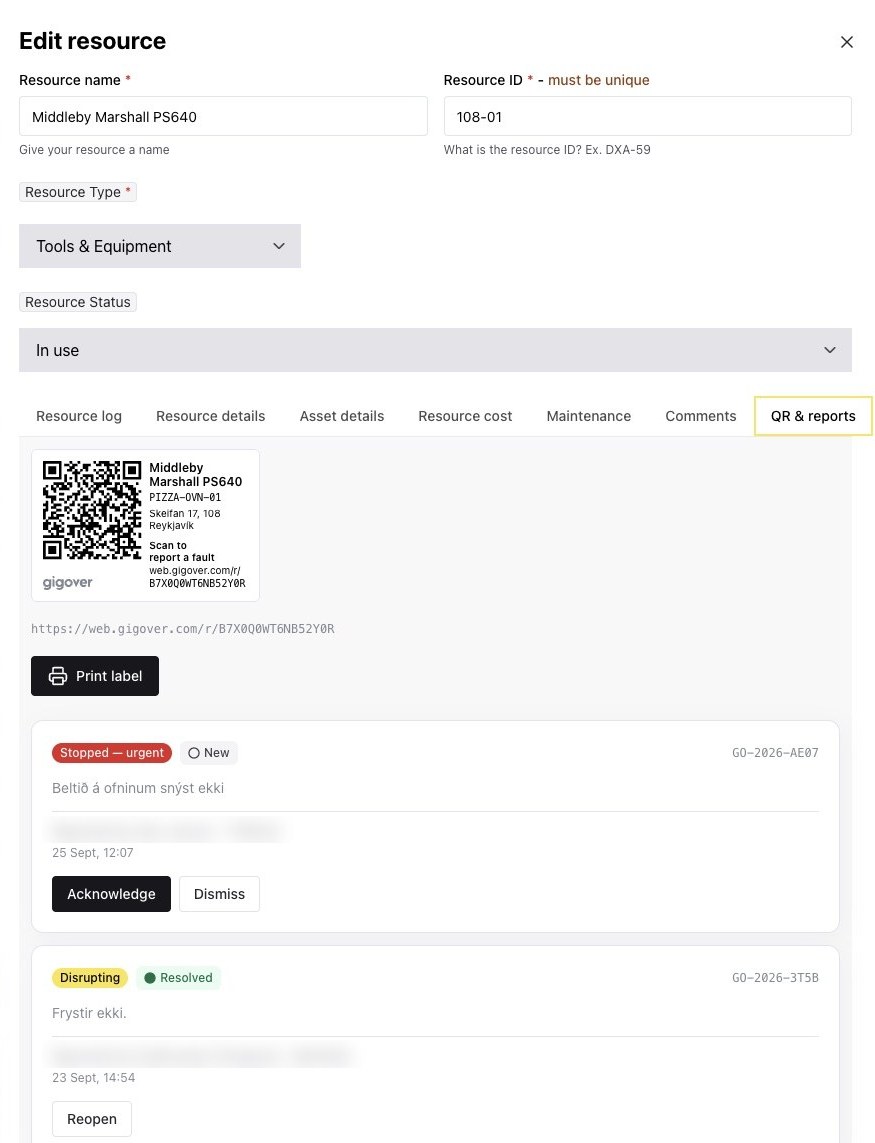
Example: An ice cream producer with hundreds of machines nationwide
An ice cream producer has hundreds of machines in shops, kiosks and restaurants across the country. When an ice cream machine stops freezing, it's the staff on site who notice, not the producer. Those staff don't know Gigover and shouldn't need to.
With a QR code on every machine, the employee doesn't need to know who to call or what number the machine has. They scan the code, describe the problem and send. The report goes straight to the person responsible for that machine at the producer, tagged with the right equipment and the right location.
Example: An international restaurant chain with many locations
A restaurant chain runs many locations, each with ovens, coolers, freezers and other machines that can't afford to stop. When every location reports faults its own way, by phone, email or text, nobody has the full picture.
With QR codes in Gigover, every location reports faults the same way. The operations manager sees in one place which equipment is down, at which location, how serious the fault is and whether it has been resolved. History builds up for each machine, making it easy to see which equipment fails most often and where replacement is due.
What you gain
- The right equipment, every time. The report is tied to the equipment itself, so nobody has to guess the model or serial number.
- The right person gets the report. It goes straight to whoever is responsible for the equipment, not to a shared inbox.
- No barrier to reporting. All it takes is a smartphone. The person reporting doesn't need access to Gigover.
- The history stays with the equipment. When did it last fail, what was done and who handled it? The answer is on record, even as staff come and go.
Where does this fit?
QR codes fit anywhere equipment is used by people other than those responsible for it:
- Ice cream machines, coolers and freezers in shops and restaurants.
- Kitchen equipment and machines at restaurants with multiple locations.
- Equipment in schools, sports facilities and other public buildings.
- Shared equipment in apartment buildings and commercial properties.
- Tools and machinery that move between job sites.
Get started today
QR codes are part of the Resources section of Gigover. Register your equipment, print the codes and attach them. From that moment on, every piece of equipment has its own reporting channel and its own history.
Want to see QR codes in action?
We'll show you how equipment is registered, labeled and linked to the right responsible person in Gigover.
Book a demo